OpenAI’s Agent Builder, part of the new AgentKit suite, introduces a visual way to design, test, and deploy AI agents, without wrestling with complex code. It’s built for teams that want to create powerful, production-ready agents quickly while maintaining safety, control, and performance visibility.
With drag-and-drop simplicity, versioning, integrated evaluations, and built-in guardrails, Agent Builder sits at the center of OpenAI’s agent ecosystem, working seamlessly with the Agents SDK, ChatKit, Evals, Connector Registry, and Responses API to offer an end-to-end development platform.
Table of Contents
Getting Started with Agent Builder
Access Agent Builder directly from the OpenAI Platform after signing in with your developer or enterprise account.
For enterprise customers who manage multiple teams or data sources, enabling the Global Admin Console is recommended, it’s required for access to the Connector Registry beta, which allows centralized connector governance.
Visit site- https://platform.openai.com/agent-builder
Creating Your First Project
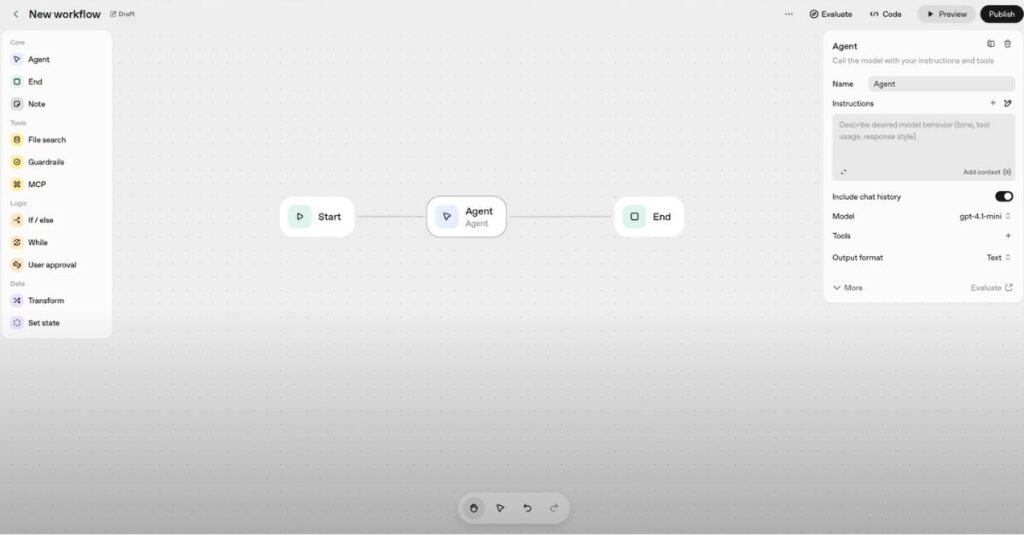
Developers can start a new project from scratch or use a prebuilt template for faster setup. Templates cover popular scenarios such as customer support agents, sales assistants, and research copilots.
Once you’ve created a project, you can:
- Name your agent and select a default model.
- Define the system prompt and output format.
- Turn on versioning to track every update and roll back changes as needed.
Building Workflows Visually
The real power of Agent Builder lies in its visual workflow canvas.
Simply drag and drop nodes to represent actions like data retrieval, decision-making, tool usage, or response formatting. Connect them with edges to define how information flows through the agent.
Developers can run preview tests at any point, either for individual components or the entire graph, and make real-time adjustments to prompts, parameters, or guardrails based on immediate performance feedback.
Integrating Tools and Connectors
Agent Builder comes with built-in tools that extend what your agent can do, such as web search, file search, code execution, image generation, and even computer use.
To give agents secure access to business data, you can connect external sources via the Connector Registry. This supports integrations with Dropbox, Google Drive, Microsoft Teams, SharePoint, and third-party MCP servers, all under enterprise-level governance controls.
Strengthening Safety with Guardrails
Safety is embedded in Agent Builder’s design.
You can enable guardrails to automatically detect and mask sensitive data (PII), block jailbreak attempts, and limit an agent’s behavior within defined boundaries.
These modular guardrails are open source and available for Python and JavaScript, allowing teams to customize them according to internal compliance or security needs. Combined with moderation tools and structured instruction hierarchies, they help ensure agents remain reliable and compliant in production.
Testing and Evaluation
The canvas integrates inline evaluations (evals), allowing teams to test and refine their agents continuously. You can:
- Build evaluation datasets.
- Run trace grading and automated prompt optimization.
- Identify and fix weak points in reasoning or accuracy.
Automated graders and human annotators can work together to improve task success rates. Teams can compare metrics across versions to quantify improvements before pushing updates live.
Fine-Tuning for Better Performance
For teams ready to push performance further, Reinforcement Fine-Tuning (RFT) is supported directly within the workflow.
RFT is generally available on o4-mini and in private beta for GPT-5, enabling advanced optimization of decision quality, reasoning depth, and tool usage.
Developers can also design custom tool calls and custom graders to fine-tune behavior around domain-specific goals or compliance standards.
Deployment and Embedding
When your agent is ready, you can embed it using ChatKit, OpenAI’s UI framework for conversational experiences. ChatKit supports features like streaming responses, threaded interactions, and branded “thinking” states that align with your product’s design.
For development teams who prefer a code-based setup, the Agents SDK (available in Python and TypeScript) offers orchestration, tracing, and deployment options that mirror everything available in the visual builder.
Pricing and Availability
Agent Builder is currently in beta, while ChatKit and Evals are generally available. The Connector Registry is also in beta.
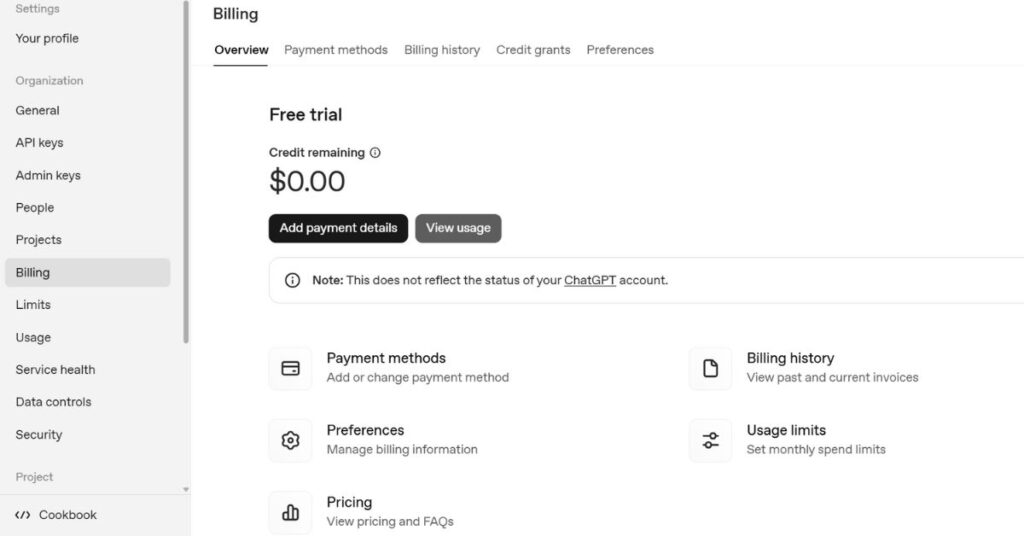
All these tools are included under standard API model pricing, with no separate subscription fee.
Usage is billed based on tokens consumed, and details are listed on OpenAI’s Pricing page. Updates on beta availability and rollout timelines are posted in the documentation.
Quickstart Guide
- Sign in to the OpenAI Platform and open Agent Builder under the AgentKit section.
- Start from a template or blank canvas, select a model, and enable versioning.
- Add nodes for retrieval, search, code execution, or decision logic.
- Attach tools and connectors to access external data and APIs.
- Turn on guardrails to enforce safety and moderation rules.
- Run previews and inline evals to check performance and behavior.
- Iterate using datasets and graders from the Evals suite.
- Deploy with ChatKit or through the Agents SDK.
- Monitor and trace performance after deployment.
Best Practices
- Keep system prompts short and purpose-driven.
- Add retrieval nodes only when context is truly needed.
- Implement guardrails early, it saves time during compliance and QA reviews.
- Version frequently and use trace grading on real tasks to monitor reliability.
- Automate prompt optimization with Evals to lock in performance gains at each release.
When to Use the SDK Instead
The Agents SDK is ideal for developers who need:
- Deep integration with existing apps or services.
- CI/CD pipelines and observability support.
- Multi-environment deployment (staging, production, etc.).
Meanwhile, Agent Builder is best for collaborative design involving product managers, designers, and compliance teams. It provides a shared, visual environment for rapid experimentation before critical workflows are finalized in code.
In Summary
OpenAI’s Agent Builder brings a visual, safe, and collaborative approach to creating AI agents. By combining visual design, automatic evaluation, governance, and direct deployment, it turns agent creation into a streamlined, transparent process. Whether you’re prototyping a simple support assistant or launching a complex enterprise agent, Agent Builder shortens the path from concept to production, without compromising safety or control.


